
Supports are defined based on their degrees of freedom in the X/Y/Z and/or Xr/Yr/Zr directions. For each direction, it is specified whether the support is fixed, free, or a spring. In this chapter, linear spring supports are described. MatrixFrame can also perform calculations with non-linear spring bearings, which are described in the following chapter.
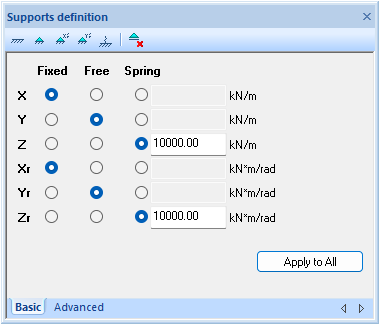
Degrees of freedom can be assigned individually by setting each direction (X/Y/Z and/or Xr/Yr/Zr) to fixed, free, or spring. The screenshot above illustrates this for 3D frameworks.
The buttons at the top of the dialog provide shortcuts. For example, selecting the leftmost button sets all X/Y/Z and Xr/Yr/Zr directions to fixed.

Once supports are defined and assigned to the calculation model, they are displayed in the tables. The screenshot above shows supports in the tables for 3D frameworks.
The properties of the supports can be adjusted either in the definition dialog or directly in the tables.
Supports at an angle
The table provides input fields for Angle Xr, Angle Yr, and Angle Zr. These fields allow specifying the orientation of a support with respect to the global coordinate system, in degrees.
Supports under members
In general, supports are attached to nodes. For project types 1D-Beam and 2D-Grillage, supports can also be assigned to members with a specified distance from the start of the member.
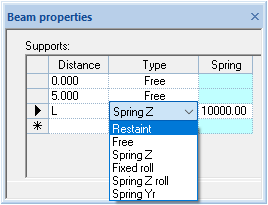
The screenshot above shows the dialog for 1D beams. During calculation, these support types are converted into fixed, free, or spring supports according to the general notation method.
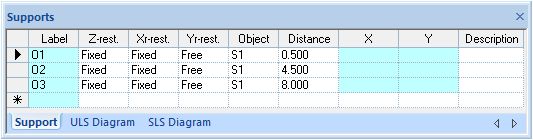
The screenshot above shows the table representation of support layouts for 2D-Grillage.
In this setup, supports can be positioned freely under the bars without adjusting the schematics of the members or applied loads. This feature, referred to as “free support placement”, allows for the optimal positioning of foundation piles in a straightforward manner.
Supports for FEM plates and FEM walls
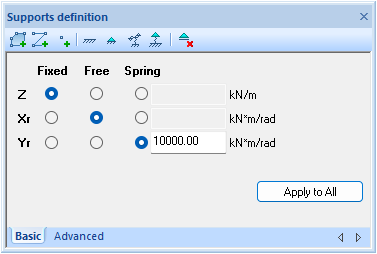
For FEM plates and FEM walls, supports are not limited to point supports; line and area supports are also available. The screenshot above shows the dialog for FEM plates.
This type of support is discussed in more detail in the chapter “FEM Plates and FEM Walls.”
2D-Grillage-specific eccentric placement of supports
The eccentric shift of supports is implemented exclusively for the 2D-Grillage package.
The support eccentricity refers to a displacement of the support along the local Y′ coordinate of the member axis. This displacement can be specified as either a positive or negative value:
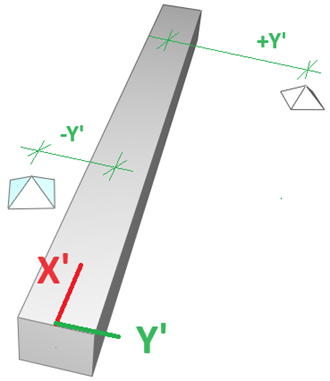
Supports located at the start and/or end nodes of a member cannot be shifted.
The eccentric shift can be entered in the support definition window and in the grid table under the advanced properties of the support, e.g., “Eccentricity: 0.000 m”. The default value of 0.000 m indicates that the support position is not shifted.
The local eccentric shift is displayed on the structural drawing, showing the support displaced eccentrically relative to the member’s central axis.
The calculation of supports placed on members accounts for the torsional force caused by eccentric support placement. When eccentric supports are defined, the advanced analysis option for reduced torsion is neither meaningful nor recommended.
Units
The units for supports are as follows:
- Translational springs: kN/m
- Rotational springs: kN·m/rad
Table of degrees of freedom by project type
Project type | Supports degrees of freedom | |||||
X | Y | Z | Xr | Yr | Zr | |
| 1D-Beam | - | - | + | - | + | - |
| 1.5D-Beam | + | + | + | + | + | + |
| 2D-Grillage | - | - | + | + | + | - |
| 2.5D-Grillage | + | + | + | + | + | + |
| 2D-Frame | + | - | + | - | + | - |
| 2D-Truss | + | - | + | - | + | - |
| 2.5D-Frame | + | + | + | + | + | + |
| 3D-Frame | + | + | + | + | + | + |
| 3D-Truss | + | + | + | + | + | + |
| 2D-Plate | - | - | + | + | + | - |
| 2D-Wall | + | + | + | + | + | + |